
Daily Bloom
계획적인 J형을 위한 가장 아름다운 시작.
친구와 함께 꿈을 피워보세요.
The most beautiful start for structured minds.
Bloom your day together with friends.
별도의 앱 설치 없이 웹에서 바로 실행됩니다. Runs directly on the web. No installation required.
누구를 위한 플래너인가요? Who is this for?
체계적인 J형 (MBTI)Structured MBTI 'J'
즉흥적인 것은 불안한 당신.
깔끔하게 정리된 일정표를 보면 마음이 편안해지는 분들을 위해 설계되었습니다.
Do you feel anxious without a plan?
Daily Bloom is designed for those who find peace in a well-organized schedule.
대학생 & 취준생Students & Strivers
시험 기간 공부 계획, 자격증 일정.
친구들과 서로의 공부 시간을 공유하고 서로 자극을 주고받으세요.
Perfect for exam prep and goal tracking.
Share your study schedule with friends and motivate each other.
여행 & 프로젝트 러버Travelers & Project Lovers
"2박 3일 부산 여행"
연속된 일정을 시각적인 막대그래프(Gantt Chart)로 한눈에 관리하고 싶다면 딱입니다.
"3-day trip to Paris"
Manage multi-day events with a beautiful visual bar (Gantt-style) at a glance.
85%
목표 달성률 증가 Goal Achievement
시각적인 동기부여 효과 Visual motivation effect
3x
습관 지속성 Habit Retention
친구와 함께할 때의 효과 Power of social accountability
100%
프라이버시 보호 Privacy Protected
나만의 비밀 일정 완벽 분리 Secure private schedule mode
Daily Bloom만의 특별함 Why Daily Bloom?
01. 입력은 단순하게, 표현은 화려하게 01. Simple Input, Rich Visualization
복잡한 설정창은 버렸습니다. 카톡 보내듯 텍스트만 입력하세요.
• #d3 : "제주도 여행 #d3" → 3일짜리 긴 일정 바 생성
• #w4 : "필라테스 #w8" → 8주 동안 자동 반복 등록
Forget complex forms. Just type like you're texting.
• #d3 : "Trip #d3" → Creates a 3-day duration bar.
• #w4 : "Yoga #w8" → Repeats every week for 8 weeks.
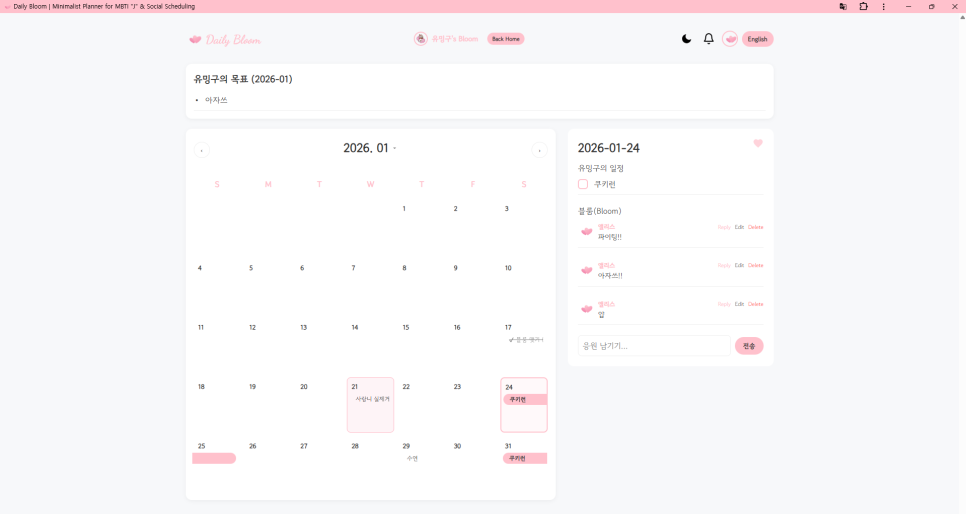
02. 친구와 함께 피우는 하루 (Bloom) 02. Bloom Together (Social)
혼자만의 계획은 작심삼일로 끝나기 쉽습니다.
친구의 캘린더에 방문해 Bloom(꽃)을 남겨주세요.
응원의 댓글과 함께라면 귀찮았던 할 일도 즐거운 미션이 됩니다. @친구태그 기능으로 약속을 한 번에 공유하는 것도 잊지 마세요.
Planning alone is hard. Doing it together is fun.
Visit your friends' calendars and leave a Bloom.
Encouragement turns chores into missions. Use @Tag to share events instantly with your Blooms.
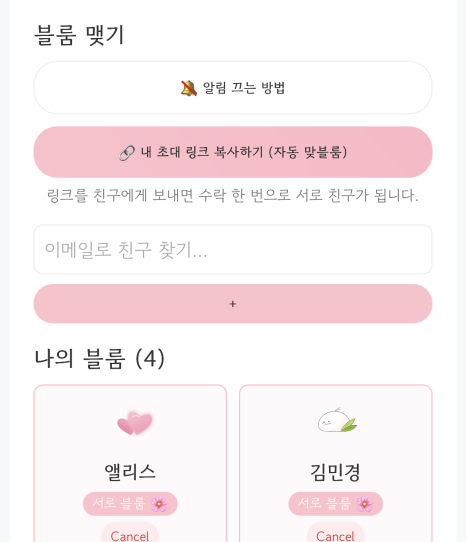
03. 나를 위한 완벽한 프라이버시 03. Perfect Privacy Control
공유하고 싶지 않은 비밀 일정이 있나요?
자물쇠(🔒) 버튼 하나면 충분합니다.
나에게만 보이는 비밀 일정, 우리끼리만 보는 태그 일정, 모두에게 보여줄 공개 일정을 자유롭게 오가며 관리하세요.
Have a secret you don't want to share?
Just click the Lock (🔒) icon.
Switch between Private, Protected (tagged only), and Public modes effortlessly.
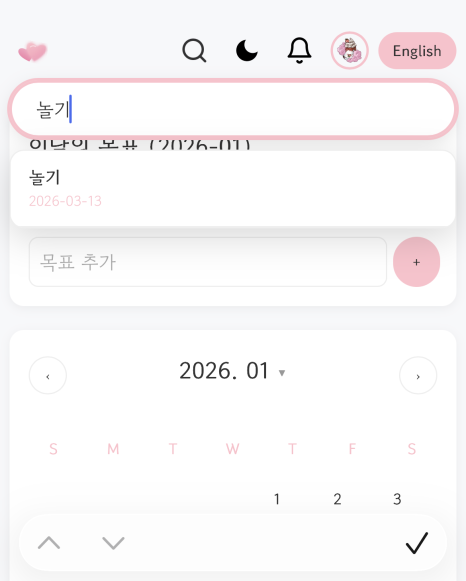
J형을 위한 시간 관리 꿀팁 Productivity Tips for J-Types
Tip 01.
계획이 틀어졌을 때 When plans go wrong
스트레스 받지 마세요. Daily Bloom에서는 일정을 드래그해서 다음 날로 미루는 것이 1초면 충분합니다. 유연함이 지속성을 만듭니다. Don't stress. In Daily Bloom, dragging a task to the next day takes 1 second. Flexibility creates sustainability.
Tip 02.
우선순위의 마법 Magic of Priorities
모든 일을 다 할 순 없습니다. 가장 중요한 'Monthly Goal'을 먼저 캘린더 상단에 박제하세요. 큰 그림을 놓치지 않게 도와줍니다. You can't do it all. Pin your 'Monthly Goal' at the top of the calendar. Never lose sight of the big picture.
Tip 03.
함께하는 힘 Power of Togetherness
운동이나 공부처럼 하기 싫은 일은 친구와 공유(Tag)하세요. 감시자가 있을 때 우리의 실행력은 200% 올라갑니다. Tag a friend for workouts or study sessions. Accountability boosts execution by 200%.
사용자 후기 What Users Say
❝
"매번 작심삼일이었는데 친구랑 같이 하니 벌써 3달째 성공 중이에요! 서로 블룸 남겨주는 재미가 쏠쏠합니다." "I used to quit easily, but doing it with friends kept me going for 3 months! Leaving Blooms for each other is so fun."
- 대학생 김OOStudent Kim❝
"회사 일정과 개인 약속이 섞이는 게 싫었는데, 자물쇠 기능으로 완벽하게 분리했어요. 심플해서 너무 좋습니다." "I hated mixing work and private life. The Lock feature separated them perfectly. Simple and effective."
- 직장인 이OOOffice Worker Lee❝
"여행 계획 짤 때 엑셀 켜기 귀찮았는데, #d3 태그 하나로 3박 4일 일정이 쫙! J형의 마음을 너무 잘 아네요." "Planning trips in Excel was a pain. One #d3 tag and my 4-day itinerary is set! It truly understands J-types."
- 여행러 박OOTraveler Park자주 묻는 질문 (FAQ) Frequently Asked Questions
Q. 정말 무료인가요?
Q. Is it really free?
네, Daily Bloom의 모든 핵심 기능은 평생 무료로 제공됩니다. 친구 초대, 일정 공유, 무제한 캘린더 등 모든 기능을 자유롭게 이용하세요.
Yes! All core features are free forever. Invite friends, share tasks, and use unlimited calendar items at no cost.
Q. 앱을 다운로드해야 하나요?
Q. Do I need to download an app?
아니요! 웹사이트(PWA) 기반이라 설치 없이 즐겨찾기만 하면 됩니다. 물론, 홈 화면에 추가하면 진짜 앱처럼 전체 화면으로 사용할 수도 있습니다.
No! It's a web-based PWA. Just bookmark it. You can also "Add to Home Screen" to use it as a standalone app.
Q. 친구 추가는 어떻게 하나요?
Q. How do I add friends?
로그인 후 [마이페이지]에서 '초대 링크 복사'를 누르세요. 카톡으로 링크를 보내면 친구가 클릭 한 번으로 바로 '맞블룸(친구)'이 맺어집니다.
Go to 'My Page' and copy your 'Invite Link'. Send it to a friend, and they'll become your Mutual Bloom with one click.
Ready to Bloom?
지금 바로 당신의 하루를 아름답게 계획해보세요. Start planning your beautiful day right now.